接續說明壓縮PDF檔案的程式碼
會分成兩個部分
第1個是主程序,設定相關的參數
這是因為壓縮PDF的參數比較多
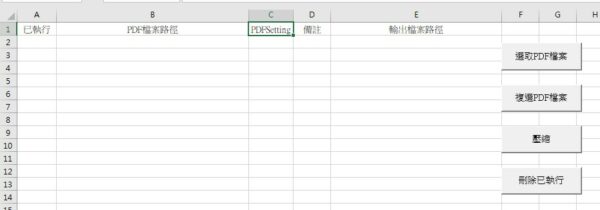
但我這邊是用預設的參數設定PDFSetting:/ebook 、/screen
如果沒有指定就預設為/ebook
第2個部分則是Ghostscript PDF 壓縮的function
接收主程序傳來的參數
當然這兩個部分的程式碼可以合併
不過這樣就顯得冗長,不符合現在程式設計的原則-模組化
操作介面如下
第1部分的程式碼
1
2
3
4
5
6
7
8
9
10
11
12
13
14
15
16
17
18
19
20
21
22
23
24
25
26
27
28
29
30
31
32
33
34
35
36
37
38
39
40
41
42
43
44
45
46
47
48
49
50
51
52
53
54
55
56
57
58
59
60
61
62
63
64
65
66
67
68
69
70
71
72
73
2
3
4
5
6
7
8
9
10
11
12
13
14
15
16
17
18
19
20
21
22
23
24
25
26
27
28
29
30
31
32
33
34
35
36
37
38
39
40
41
42
43
44
45
46
47
48
49
50
51
52
53
54
55
56
57
58
59
60
61
62
63
64
65
66
67
68
69
70
71
72
73
Sub RunPDFCompression_WS2()
Dim InputPDF As String
Dim OutputPDF_Default As String
Dim OutputPDF_Targeted As String
r = Sheets(1).Range("B1").End(xlDown).Row
If r = 1048576 Then
Exit Sub
End If
For i = 2 To r
If Range("A" & i) <> "◎" Then
'PDF 檔案路徑
InputPDF = Range("B" & i).Value
InputPDFSetting = Range("C" & i).Value
If Dir(InputPDF) = "" Then
MsgBox "輸入檔案不存在: " & InputPDF, vbCritical
Exit Sub
End If
' ----------------------------------------------------------------------------------
' select case
' ----------------------------------------------------------------------------------
Select Case InputPDFSetting
Case Is = "/ebook"
OutputPDF_Default = Replace(InputPDF, ".pdf", "_Ebook.pdf")
If CompressPDF_GS_WScript2(InputPDF, OutputPDF_Default, "/ebook") Then
Debug.Print "Ebook 壓縮完成: " & OutputPDF_Default
Range("E" & i).Value = OutputPDF_Default
Range("A" & i).Value = "◎"
Range("D" & i).Value = "壓縮完成"
MsgBox "Ebook 壓縮完成: " & OutputPDF_Default, vbInformation
Else
Debug.Print "Ebook 壓縮失敗。"
Range("D" & i).Value = "壓縮失敗"
End If
Case Is = "/screen"
OutputPDF_Default = Replace(InputPDF, ".pdf", "_Screen.pdf")
If CompressPDF_GS_WScript2(InputPDF, OutputPDF_Default, "/screen", 50, 72) Then
Debug.Print "Ebook 壓縮完成: " & OutputPDF_Default
Range("G" & i).Value = OutputPDF_Default
Range("A" & i).Value = "◎"
Range("D" & i).Value = "壓縮完成"
MsgBox "Screen 壓縮完成: " & OutputPDF_Default, vbInformation
Else
Debug.Print "Screen 壓縮失敗。"
Range("D" & i).Value = "壓縮失敗"
End If
Case Else
OutputPDF_Default = Replace(InputPDF, ".pdf", "_Default.pdf")
If CompressPDF_GS_WScript2(InputPDF, OutputPDF_Default) Then
Debug.Print "Ebook 壓縮完成: " & OutputPDF_Default
Range("E" & i).Value = OutputPDF_Default
Range("A" & i).Value = "◎"
Range("D" & i).Value = "壓縮完成"
MsgBox "Default 壓縮完成: " & OutputPDF_Default, vbInformation
Else
Debug.Print "Default 壓縮失敗。"
Range("D" & i).Value = "壓縮失敗"
End If
End Select
End If
Next
End Sub
Dim InputPDF As String
Dim OutputPDF_Default As String
Dim OutputPDF_Targeted As String
r = Sheets(1).Range("B1").End(xlDown).Row
If r = 1048576 Then
Exit Sub
End If
For i = 2 To r
If Range("A" & i) <> "◎" Then
'PDF 檔案路徑
InputPDF = Range("B" & i).Value
InputPDFSetting = Range("C" & i).Value
If Dir(InputPDF) = "" Then
MsgBox "輸入檔案不存在: " & InputPDF, vbCritical
Exit Sub
End If
' ----------------------------------------------------------------------------------
' select case
' ----------------------------------------------------------------------------------
Select Case InputPDFSetting
Case Is = "/ebook"
OutputPDF_Default = Replace(InputPDF, ".pdf", "_Ebook.pdf")
If CompressPDF_GS_WScript2(InputPDF, OutputPDF_Default, "/ebook") Then
Debug.Print "Ebook 壓縮完成: " & OutputPDF_Default
Range("E" & i).Value = OutputPDF_Default
Range("A" & i).Value = "◎"
Range("D" & i).Value = "壓縮完成"
MsgBox "Ebook 壓縮完成: " & OutputPDF_Default, vbInformation
Else
Debug.Print "Ebook 壓縮失敗。"
Range("D" & i).Value = "壓縮失敗"
End If
Case Is = "/screen"
OutputPDF_Default = Replace(InputPDF, ".pdf", "_Screen.pdf")
If CompressPDF_GS_WScript2(InputPDF, OutputPDF_Default, "/screen", 50, 72) Then
Debug.Print "Ebook 壓縮完成: " & OutputPDF_Default
Range("G" & i).Value = OutputPDF_Default
Range("A" & i).Value = "◎"
Range("D" & i).Value = "壓縮完成"
MsgBox "Screen 壓縮完成: " & OutputPDF_Default, vbInformation
Else
Debug.Print "Screen 壓縮失敗。"
Range("D" & i).Value = "壓縮失敗"
End If
Case Else
OutputPDF_Default = Replace(InputPDF, ".pdf", "_Default.pdf")
If CompressPDF_GS_WScript2(InputPDF, OutputPDF_Default) Then
Debug.Print "Ebook 壓縮完成: " & OutputPDF_Default
Range("E" & i).Value = OutputPDF_Default
Range("A" & i).Value = "◎"
Range("D" & i).Value = "壓縮完成"
MsgBox "Default 壓縮完成: " & OutputPDF_Default, vbInformation
Else
Debug.Print "Default 壓縮失敗。"
Range("D" & i).Value = "壓縮失敗"
End If
End Select
End If
Next
End Sub
第2部分的程式碼
1
2
3
4
5
6
7
8
9
10
11
12
13
14
15
16
17
18
19
20
21
22
23
24
25
26
27
28
29
30
31
32
33
34
35
36
37
38
39
40
41
42
43
44
45
46
47
48
49
50
51
52
53
54
55
56
57
58
59
60
61
62
63
64
65
66
67
68
69
70
71
72
73
74
75
76
77
78
79
80
81
82
83
84
85
86
87
88
89
90
91
92
93
94
95
96
97
98
99
100
101
102
103
104
105
106
107
2
3
4
5
6
7
8
9
10
11
12
13
14
15
16
17
18
19
20
21
22
23
24
25
26
27
28
29
30
31
32
33
34
35
36
37
38
39
40
41
42
43
44
45
46
47
48
49
50
51
52
53
54
55
56
57
58
59
60
61
62
63
64
65
66
67
68
69
70
71
72
73
74
75
76
77
78
79
80
81
82
83
84
85
86
87
88
89
90
91
92
93
94
95
96
97
98
99
100
101
102
103
104
105
106
107
' Ghostscript PDF 壓縮函數 (VBA - 使用 WScript.Shell.Run)
' --------------------------------------------------------------------------------------------------------
' WScript.Shell 的 Run 方法 (WaitOnReturn:=True) 能確保程式碼等待 Ghostscript 完成後才繼續執行。
'========================================================================================================
Function CompressPDF_GS_WScript2( _
ByVal InputFilePath As String, _
ByVal OutputFilePath As String, _
Optional ByVal PDFSetting As String = "/ebook", _
Optional ByVal JPEGQuality As Long = 80, _
Optional ByVal DPI As Long = 150 _
) As Boolean
Dim CmdLine As String
Dim WshShell As Object
Dim ErrorCode As Long ' WshShell.Run 的返回值 (通常 0 表示成功)
Dim GHOSTSCRIPT_EXE As String
' ----------------------------------------------------------------------------------
' 1. 指定 Ghostscript 執行檔名稱或路徑
' * 如果 PATH 已設定 (推薦),使用 gswin64c。
' * 如果 PATH 未設定,請使用完整的路徑並加上雙引號,例如:
' GHOSTSCRIPT_EXE = "C:\Program Files\gs\gs10.06.0\bin\gswin64c.exe"
' ----------------------------------------------------------------------------------
GHOSTSCRIPT_EXE = "gswin64c"
' ----------------------------------------------------------------------------------
' 2. 建構 Ghostscript 命令字串
' - 必須用雙引號 (Chr(34)) 將路徑包起來,以處理路徑中的空格。
' ----------------------------------------------------------------------------------
' WScript.Shell.Run 的命令字串不允許直接使用 gswin64c.exe,如果它不在 PATH 中,
' 因此我們需要將執行檔也包在雙引號中 (如果有空格的話)。
If InStr(GHOSTSCRIPT_EXE, " ") > 0 Then
GHOSTSCRIPT_EXE = Chr(34) & GHOSTSCRIPT_EXE & Chr(34)
End If
CmdLine = GHOSTSCRIPT_EXE & " " & _
"-sDEVICE=pdfwrite " & _
"-dCompatibilityLevel=1.4 " & _
"-dNOPAUSE -dQUIET -dBATCH "
If Not IsEmpty(PDFSetting) Then
CmdLine = CmdLine & "-dPDFSETTINGS=" & PDFSetting & " "
End If
If DPI > 0 Then
CmdLine = CmdLine & "-dDownsampleColorImages=true " & _
"-dDownsampleGrayImages=true " & _
"-dColorImageResolution=" & DPI & " " & _
"-dGrayImageResolution=" & DPI & " "
End If
If JPEGQuality >= 0 And JPEGQuality <= 100 Then
CmdLine = CmdLine & "-dJPEGQ=" & JPEGQuality & " "
End If
' 輸出與輸入檔案 (路徑務必使用 Chr(34) 包起來):
CmdLine = CmdLine & "-sOutputFile=" & Chr(34) & OutputFilePath & Chr(34) & " " & _
Chr(34) & InputFilePath & Chr(34)
' ----------------------------------------------------------------------------------
' 3. 執行命令並等待完成
' ----------------------------------------------------------------------------------
On Error GoTo ErrorHandler
Debug.Print "壓縮中"
' 創建 WScript.Shell 物件
Set WshShell = CreateObject("WScript.Shell")
' 執行 Run 方法:
' 第二個參數 (0):隱藏命令視窗 (vbHide)
' 第三個參數 (True):等待外部程式執行完畢才返回
ErrorCode = WshShell.Run(CmdLine, 0, True)
' 清理物件
Set WshShell = Nothing
' ----------------------------------------------------------------------------------
' 4. 檢查執行結果
' - Ghostscript 通常成功會返回 0。
' ----------------------------------------------------------------------------------
If ErrorCode = 0 Then
' 額外檢查輸出檔案是否存在 (增強檢查)
If Len(Dir(OutputFilePath)) > 0 Then
CompressPDF_GS_WScript2 = True
Else
MsgBox "Ghostscript 執行成功,但輸出檔案不存在。請檢查輸入檔案和權限。", vbExclamation
CompressPDF_GS_WScript2 = False
End If
Else
MsgBox "Ghostscript 執行失敗。錯誤代碼: " & ErrorCode & vbCrLf & "完整命令: " & CmdLine, vbCritical
CompressPDF_GS_WScript2 = False
End If
Exit Function
ErrorHandler:
' 如果 CreateObject 失敗或其他 VBA 錯誤
If Not WshShell Is Nothing Then Set WshShell = Nothing
MsgBox "VBA 或 WScript.Shell 錯誤:" & Err.Description, vbCritical
CompressPDF_GS_WScript2 = False
End Function
' --------------------------------------------------------------------------------------------------------
' WScript.Shell 的 Run 方法 (WaitOnReturn:=True) 能確保程式碼等待 Ghostscript 完成後才繼續執行。
'========================================================================================================
Function CompressPDF_GS_WScript2( _
ByVal InputFilePath As String, _
ByVal OutputFilePath As String, _
Optional ByVal PDFSetting As String = "/ebook", _
Optional ByVal JPEGQuality As Long = 80, _
Optional ByVal DPI As Long = 150 _
) As Boolean
Dim CmdLine As String
Dim WshShell As Object
Dim ErrorCode As Long ' WshShell.Run 的返回值 (通常 0 表示成功)
Dim GHOSTSCRIPT_EXE As String
' ----------------------------------------------------------------------------------
' 1. 指定 Ghostscript 執行檔名稱或路徑
' * 如果 PATH 已設定 (推薦),使用 gswin64c。
' * 如果 PATH 未設定,請使用完整的路徑並加上雙引號,例如:
' GHOSTSCRIPT_EXE = "C:\Program Files\gs\gs10.06.0\bin\gswin64c.exe"
' ----------------------------------------------------------------------------------
GHOSTSCRIPT_EXE = "gswin64c"
' ----------------------------------------------------------------------------------
' 2. 建構 Ghostscript 命令字串
' - 必須用雙引號 (Chr(34)) 將路徑包起來,以處理路徑中的空格。
' ----------------------------------------------------------------------------------
' WScript.Shell.Run 的命令字串不允許直接使用 gswin64c.exe,如果它不在 PATH 中,
' 因此我們需要將執行檔也包在雙引號中 (如果有空格的話)。
If InStr(GHOSTSCRIPT_EXE, " ") > 0 Then
GHOSTSCRIPT_EXE = Chr(34) & GHOSTSCRIPT_EXE & Chr(34)
End If
CmdLine = GHOSTSCRIPT_EXE & " " & _
"-sDEVICE=pdfwrite " & _
"-dCompatibilityLevel=1.4 " & _
"-dNOPAUSE -dQUIET -dBATCH "
If Not IsEmpty(PDFSetting) Then
CmdLine = CmdLine & "-dPDFSETTINGS=" & PDFSetting & " "
End If
If DPI > 0 Then
CmdLine = CmdLine & "-dDownsampleColorImages=true " & _
"-dDownsampleGrayImages=true " & _
"-dColorImageResolution=" & DPI & " " & _
"-dGrayImageResolution=" & DPI & " "
End If
If JPEGQuality >= 0 And JPEGQuality <= 100 Then
CmdLine = CmdLine & "-dJPEGQ=" & JPEGQuality & " "
End If
' 輸出與輸入檔案 (路徑務必使用 Chr(34) 包起來):
CmdLine = CmdLine & "-sOutputFile=" & Chr(34) & OutputFilePath & Chr(34) & " " & _
Chr(34) & InputFilePath & Chr(34)
' ----------------------------------------------------------------------------------
' 3. 執行命令並等待完成
' ----------------------------------------------------------------------------------
On Error GoTo ErrorHandler
Debug.Print "壓縮中"
' 創建 WScript.Shell 物件
Set WshShell = CreateObject("WScript.Shell")
' 執行 Run 方法:
' 第二個參數 (0):隱藏命令視窗 (vbHide)
' 第三個參數 (True):等待外部程式執行完畢才返回
ErrorCode = WshShell.Run(CmdLine, 0, True)
' 清理物件
Set WshShell = Nothing
' ----------------------------------------------------------------------------------
' 4. 檢查執行結果
' - Ghostscript 通常成功會返回 0。
' ----------------------------------------------------------------------------------
If ErrorCode = 0 Then
' 額外檢查輸出檔案是否存在 (增強檢查)
If Len(Dir(OutputFilePath)) > 0 Then
CompressPDF_GS_WScript2 = True
Else
MsgBox "Ghostscript 執行成功,但輸出檔案不存在。請檢查輸入檔案和權限。", vbExclamation
CompressPDF_GS_WScript2 = False
End If
Else
MsgBox "Ghostscript 執行失敗。錯誤代碼: " & ErrorCode & vbCrLf & "完整命令: " & CmdLine, vbCritical
CompressPDF_GS_WScript2 = False
End If
Exit Function
ErrorHandler:
' 如果 CreateObject 失敗或其他 VBA 錯誤
If Not WshShell Is Nothing Then Set WshShell = Nothing
MsgBox "VBA 或 WScript.Shell 錯誤:" & Err.Description, vbCritical
CompressPDF_GS_WScript2 = False
End Function


0 comments:
張貼留言