最近工作上要出版的教學資源手冊,已經到了最後階段的校稿確認
所以我會把檔案依照章節拆分給原作者,讓他們確認修改情形
因為電腦沒有裝付費版的Acrobat Pro
我都是用網路上的工具,例如:iLovePDF ,來拆分廠商給的PDF檔案
但是只能用在100MB以內的PDF檔案,超過還是要成為付費會員
那為何不先壓縮檔案再拆分?因為壓縮功能也是有檔案大小的限制,是200MB
剛好我要處理的檔案超過200MB,所以既不能壓縮,也不能拆分
因此我問了Google Gemini "如何利用python程式壓縮PDF檔案"
Gemini給了2個方向
第1種是用python外掛,例如:pypdf
第2種是呼叫外部工具,Ghostscript
後來看了Ghostscript的說明網頁,他可以在命令列接收參數執行,而且他還可以拆分PDF檔案
這讓我眼睛一亮,因為這可以結合我最常用的方式
"利用Excel工作表作為操作介面執行VBA程式"
所以在python環境初步測試第2種方式,確認沒有程式碼版本問題
接著讓Gemini將程式碼改成VBA版本,整體可行之後
我將程式碼改成可以讀取工作表資料,結合其他功能成為處理程序
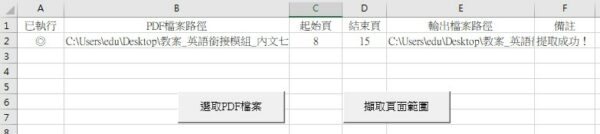
以下是拆分PDF檔案的程式碼
1
2
3
4
5
6
7
8
9
10
11
12
13
14
15
16
17
18
19
20
21
22
23
24
25
26
27
28
29
30
31
32
33
34
35
36
37
38
39
40
41
42
43
44
45
46
47
48
49
50
51
52
53
54
55
56
57
58
59
60
61
62
63
64
65
66
67
68
69
70
71
72
73
74
75
76
77
78
79
80
81
82
83
84
85
86
87
88
89
90
91
92
93
94
95
96
97
98
99
100
101
102
103
104
105
106
107
108
109
110
111
112
113
114
2
3
4
5
6
7
8
9
10
11
12
13
14
15
16
17
18
19
20
21
22
23
24
25
26
27
28
29
30
31
32
33
34
35
36
37
38
39
40
41
42
43
44
45
46
47
48
49
50
51
52
53
54
55
56
57
58
59
60
61
62
63
64
65
66
67
68
69
70
71
72
73
74
75
76
77
78
79
80
81
82
83
84
85
86
87
88
89
90
91
92
93
94
95
96
97
98
99
100
101
102
103
104
105
106
107
108
109
110
111
112
113
114
' ----------------------------------------------------------------------
' Sub: ExtractPDFPagesWithGhostscript
' 描述: 使用 WScript.Shell 執行 Ghostscript,提取 PDF 中指定範圍的頁面。
' ----------------------------------------------------------------------
Sub ExtractPDFPagesWithGhostscript()
' --- 設定區 ---
' **請務必將此路徑替換為您電腦上 Ghostscript 執行檔的實際完整路徑**
' 範例: C:\Program Files\gs\gs10.03.1\bin\gswin64c.exe
' Const GHOSTSCRIPT_PATH As String = "C:\Program Files\gs\gs10.03.1\bin\gswin64c.exe"
'gswin64c.exe已設定環境變數
Dim GHOSTSCRIPT_PATH As String
GHOSTSCRIPT_PATH = "gswin64c"
r = Sheets(1).Range("B1").End(xlDown).Row
If r = 1048576 Then
Exit Sub
End If
For i = 2 To r
If Range("A" & i) <> "◎" Then
' 輸入和輸出檔案設定
Dim InputFilePath As String
Dim OutputFilePath As String
' 頁面範圍設定 (從 1 開始)
Dim StartPage As Long
Dim EndPage As Long
' --- 變數值定義 (您可以從 Excel 單元格獲取這些值) ---
InputFilePath = Range("B" & i).Value ' 替換為輸入 PDF 路徑
StartPage = Range("C" & i).Value ' 想要開始的頁面
EndPage = Range("D" & i).Value ' 想要結束的頁面
OutputFilePath = Replace(InputFilePath, ".pdf", "_page" & StartPage & "-" & EndPage & ".pdf") ' 替換為輸出 PDF 路徑
' -----------------------------------------------------------
Dim wsh As Object
Dim CommandStr As String
Dim ReturnCode As Long
' 已設定環境變數 可以省略
' ' 檢查 Ghostscript 路徑是否正確
' If Dir(GHOSTSCRIPT_PATH) = "" Then
' MsgBox "錯誤:找不到 Ghostscript 執行檔,請檢查 GHOSTSCRIPT_PATH 設定!", vbCritical
' Exit Sub
' End If
If InStr(GHOSTSCRIPT_PATH, " ") > 0 Then
GHOSTSCRIPT_PATH = Chr(34) & GHOSTSCRIPT_PATH & Chr(34)
End If
' 檢查輸入檔案是否存在
If Dir(InputFilePath) = "" Then
MsgBox "錯誤:找不到輸入 PDF 檔案!", vbCritical
Exit Sub
End If
' 構建 Ghostscript 命令字串
' 參數說明:
' -sDEVICE=pdfwrite: 輸出格式為 PDF
' -dNOPAUSE -dBATCH -dSAFER: 標準執行模式,無互動
' -dFirstPage 和 -dLastPage: 指定提取的頁面範圍
' -sOutputFile: 指定輸出檔案
CommandStr = ""
CommandStr = CommandStr & """" & GHOSTSCRIPT_PATH & """" ' Ghostscript 執行檔 (使用雙引號包住路徑以防空格)
CommandStr = CommandStr & " -sDEVICE=pdfwrite"
CommandStr = CommandStr & " -dNOPAUSE -dBATCH -dSAFER"
CommandStr = CommandStr & " -dFirstPage=" & StartPage
CommandStr = CommandStr & " -dLastPage=" & EndPage
CommandStr = CommandStr & " -sOutputFile=" & Chr(34) & OutputFilePath & Chr(34) ' 輸出檔案 (使用 Chr(34) 即雙引號)
CommandStr = CommandStr & " " & Chr(34) & InputFilePath & Chr(34) ' 輸入檔案
' 建立 WScript.Shell 物件
Set wsh = CreateObject("WScript.Shell")
' 執行命令
' Run 方法參數:
' CommandStr: 要執行的命令
' 0: 窗口樣式 (0 = 隱藏窗口,通常用於命令列操作)
' True: 等待程式完成 (如果為 False,VBA 會繼續執行而不等待 Ghostscript 完成)
On Error Resume Next ' 忽略可能出現的錯誤,以便檢查 ReturnCode
ReturnCode = wsh.Run(CommandStr, 0, True)
On Error GoTo 0 ' 重新啟用錯誤處理
' 檢查執行結果
If ReturnCode = 0 Then
Range("A" & i).Value = "◎"
Range("E" & i).Value = OutputFilePath
Range("F" & i).Value = "提取成功!"
MsgBox "PDF 頁面 (" & StartPage & " 到 " & EndPage & ") 提取成功!" & vbNewLine & "輸出檔案:" & OutputFilePath, vbInformation
Else
Range("F" & i).Value = "Ghostscript 執行失敗!返回代碼:" & ReturnCode & vbNewLine & "請檢查命令字串及檔案路徑。"
MsgBox "Ghostscript 執行失敗!返回代碼:" & ReturnCode & vbNewLine & "請檢查命令字串及檔案路徑。", vbCritical
End If
End If
Next
' 清理物件
Set wsh = Nothing
End Sub
' Sub: ExtractPDFPagesWithGhostscript
' 描述: 使用 WScript.Shell 執行 Ghostscript,提取 PDF 中指定範圍的頁面。
' ----------------------------------------------------------------------
Sub ExtractPDFPagesWithGhostscript()
' --- 設定區 ---
' **請務必將此路徑替換為您電腦上 Ghostscript 執行檔的實際完整路徑**
' 範例: C:\Program Files\gs\gs10.03.1\bin\gswin64c.exe
' Const GHOSTSCRIPT_PATH As String = "C:\Program Files\gs\gs10.03.1\bin\gswin64c.exe"
'gswin64c.exe已設定環境變數
Dim GHOSTSCRIPT_PATH As String
GHOSTSCRIPT_PATH = "gswin64c"
r = Sheets(1).Range("B1").End(xlDown).Row
If r = 1048576 Then
Exit Sub
End If
For i = 2 To r
If Range("A" & i) <> "◎" Then
' 輸入和輸出檔案設定
Dim InputFilePath As String
Dim OutputFilePath As String
' 頁面範圍設定 (從 1 開始)
Dim StartPage As Long
Dim EndPage As Long
' --- 變數值定義 (您可以從 Excel 單元格獲取這些值) ---
InputFilePath = Range("B" & i).Value ' 替換為輸入 PDF 路徑
StartPage = Range("C" & i).Value ' 想要開始的頁面
EndPage = Range("D" & i).Value ' 想要結束的頁面
OutputFilePath = Replace(InputFilePath, ".pdf", "_page" & StartPage & "-" & EndPage & ".pdf") ' 替換為輸出 PDF 路徑
' -----------------------------------------------------------
Dim wsh As Object
Dim CommandStr As String
Dim ReturnCode As Long
' 已設定環境變數 可以省略
' ' 檢查 Ghostscript 路徑是否正確
' If Dir(GHOSTSCRIPT_PATH) = "" Then
' MsgBox "錯誤:找不到 Ghostscript 執行檔,請檢查 GHOSTSCRIPT_PATH 設定!", vbCritical
' Exit Sub
' End If
If InStr(GHOSTSCRIPT_PATH, " ") > 0 Then
GHOSTSCRIPT_PATH = Chr(34) & GHOSTSCRIPT_PATH & Chr(34)
End If
' 檢查輸入檔案是否存在
If Dir(InputFilePath) = "" Then
MsgBox "錯誤:找不到輸入 PDF 檔案!", vbCritical
Exit Sub
End If
' 構建 Ghostscript 命令字串
' 參數說明:
' -sDEVICE=pdfwrite: 輸出格式為 PDF
' -dNOPAUSE -dBATCH -dSAFER: 標準執行模式,無互動
' -dFirstPage 和 -dLastPage: 指定提取的頁面範圍
' -sOutputFile: 指定輸出檔案
CommandStr = ""
CommandStr = CommandStr & """" & GHOSTSCRIPT_PATH & """" ' Ghostscript 執行檔 (使用雙引號包住路徑以防空格)
CommandStr = CommandStr & " -sDEVICE=pdfwrite"
CommandStr = CommandStr & " -dNOPAUSE -dBATCH -dSAFER"
CommandStr = CommandStr & " -dFirstPage=" & StartPage
CommandStr = CommandStr & " -dLastPage=" & EndPage
CommandStr = CommandStr & " -sOutputFile=" & Chr(34) & OutputFilePath & Chr(34) ' 輸出檔案 (使用 Chr(34) 即雙引號)
CommandStr = CommandStr & " " & Chr(34) & InputFilePath & Chr(34) ' 輸入檔案
' 建立 WScript.Shell 物件
Set wsh = CreateObject("WScript.Shell")
' 執行命令
' Run 方法參數:
' CommandStr: 要執行的命令
' 0: 窗口樣式 (0 = 隱藏窗口,通常用於命令列操作)
' True: 等待程式完成 (如果為 False,VBA 會繼續執行而不等待 Ghostscript 完成)
On Error Resume Next ' 忽略可能出現的錯誤,以便檢查 ReturnCode
ReturnCode = wsh.Run(CommandStr, 0, True)
On Error GoTo 0 ' 重新啟用錯誤處理
' 檢查執行結果
If ReturnCode = 0 Then
Range("A" & i).Value = "◎"
Range("E" & i).Value = OutputFilePath
Range("F" & i).Value = "提取成功!"
MsgBox "PDF 頁面 (" & StartPage & " 到 " & EndPage & ") 提取成功!" & vbNewLine & "輸出檔案:" & OutputFilePath, vbInformation
Else
Range("F" & i).Value = "Ghostscript 執行失敗!返回代碼:" & ReturnCode & vbNewLine & "請檢查命令字串及檔案路徑。"
MsgBox "Ghostscript 執行失敗!返回代碼:" & ReturnCode & vbNewLine & "請檢查命令字串及檔案路徑。", vbCritical
End If
End If
Next
' 清理物件
Set wsh = Nothing
End Sub


0 comments:
張貼留言